
A lot goes into book printing or booklet printing. You have to design and lay out each booklet page and select the type of binding you want, which also sets the limit on your booklet page count. The content needs to be written, and pictures, graphs, and other visual images (if needed) must be produced or acquired. You have to select the type of paper and whether you want full color printing or just black and white. And you have to decide how many copies you need.
There’s one more thing you need to do before sending your booklet pages to the printer, and that’s to make sure you have correctly counted the number of pages. This may seem like a minor task, but having an accurate printer page count in your book or booklet achieves two important goals. It helps your order go through more smoothly, and it enhances communication with the customer service representatives about pages in your file. It pays to take the time to ensure you have an accurate printer page count before submitting your project to the printer.
Incorrectly counting your booklet pages (i.e., counting by sheets or forgetting the covers) will cause your order to be misquoted when you check out. Your order will also be put on hold until we resolve the page count and collect additional payments.

The simple way to count your booklet pages
You might be surprised at the many ways you can come up with an inaccurate printer page count. Some people forget to include the covers. Some count the sheets of paper rather than the actual pages. Others may not include blank pages (such as the inside of the covers) in their total.
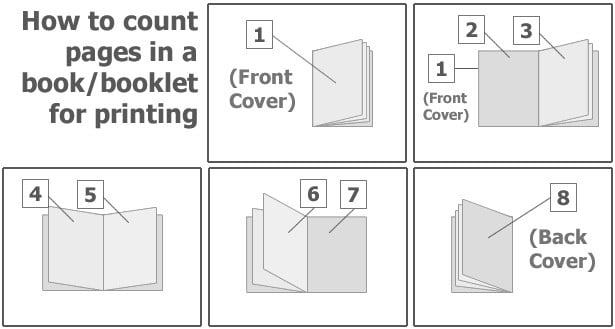
Fortunately, there’s a simple answer to how to count pages in a book for printing. To come up with the correct page count for your book or booklet, count every page, back and front, starting with the front cover. Here’s an example to help you visualize how printing companies count booklet pages when printing. Imagine your closed book is in front of you, so you’re looking at the front cover.
- The front cover is counted as “page 1”
- Next, flip open the first page of your book. The left side, which is the inside of the front cover, is counted as “page 2”. The right page is “page 3,” even if it is blank.
- One at a time, turn each page – counting the left and right pages as separate pages – until you reach the end of the book.
- When you’ve finished flipping through all the pages, so you’ve closed the book, and you’re looking at the back cover, count the back cover as a page
Count Pages, Not Sheets
For saddle-stitched booklets, the total page count must be a multiple of four. Common booklet page counts include 8, 12, 16, 20, 24, and 28 pages.
The reason is simple: one physical sheet has a front and back, and when that sheet is folded in half, it creates four booklet pages. Because saddle-stitch binding uses folded sheets, the final booklet page count needs to divide evenly into groups of four.
This is why counting sheets instead of pages can lead to an incorrect booklet page count. Each printed side counts as one page, including blank pages and cover pages when applicable.
When preparing a saddle-stitched booklet, count every page in the file and make sure the final total is a multiple of four before sending it to print.
How many pages in a booklet? It depends on the binding
The binding you choose sets your maximum booklet page count, from 64 pages with saddle stitching to 400 with spiral or PUR binding. Here’s how each Printivity binding compares:
- Saddle-stitched booklets: Up to 64 pages, in multiples of four, held together with two staples along the fold.
- Square saddle-bound booklets: 68 to 144 pages, with a squared-off spine for thicker projects. Past 120 pages, your paper choices narrow to lighter stocks.
- Perfect bound books: Up to 200 pages, glued into the spine.
- PUR perfect bound books: Up to 400 pages. PUR (polyurethane reactive) glue gives the spine extra strength for thick catalogs and reference materials.
- Spiral bound booklets: Up to 400 pages, on a plastic coil that lets every page lie flat.
- Wire-O booklets: From just a few pages up to 200, on a metal coil that also lies flat.
Count the cover pages – even if they’re blank
When you get books and booklets printed online, always count the cover pages – even if they’re blank. In our page counting example, notice that we counted the front cover as two pages (front & back), and we counted the back as two pages (front & back). In many cases, both inside cover pages have no content, especially with hardbound books. Either way, every page in the book must be counted to get an accurate printer page count.
The only time you don’t count blank pages is when you order single-sided printing. This option is only available on Spiral Bound Booklet Printing and Wire-Bound Book Printing. To avoid confusion, reference the PDF page count for accuracy. Once your count is set, our booklet layout guide shows you how to put those pages in order.
At Printivity, when you talk with one of our service representatives about your booklet pages, they will almost always talk in terms of “pages of a book.” This is how we quote the pricing for your booklet printing project.
When the customer service representative calls you to discuss a part of your design, they’ll tell you something like, “Please check out page 16”. They want you to scroll to page 16 of your PDF file, or flip to page 16 of your booklet.
If you’re still confused about your printer page count, don’t worry! It’s not the end of the world if you miscount the pages. A customer service representative will help you sort it out after you’ve placed your order.
FAQ: Booklet page count
Does the cover count as page 1 in a booklet?
Yes, the front cover counts as page 1 in a booklet. The inside of the front cover is page 2, on your left as you open the booklet. The first right-hand page is page 3, even if you leave it blank.
Can a booklet be 10 pages?
Yes, a booklet can be 10 pages with Wire-O binding. Printivity offers Wire-O from just a few pages. A saddle-stitched booklet can’t be 10 pages, though, because its page count has to be a multiple of four. In that case, you’d round up to 12 pages by adding two blank or note pages, or cut the design down to 8.
Do blank pages count toward a booklet’s page count?
Yes, blank pages count toward a booklet’s page count, including a blank inside front or back cover. Every side of every sheet is a page, even with nothing printed on it. The one exception is single-sided printing on Printivity’s spiral bound and Wire-O booklets, where you leave the blank back of each sheet out of the total.
How many pages is a booklet?
A booklet usually has between 8 and 36 pages. Printivity’s guide to booklets uses that range and calls longer projects books. Even so, the binding sets the practical ceiling for your booklet. How many pages it can take tops out at 64 with standard saddle stitching, 144 with square saddle binding, and 400 with spiral or PUR binding.
What happens if I order a Printivity booklet with the wrong page count?
If you order a Printivity booklet with the wrong page count, your checkout quote won’t match the pages in your file. Because we check every file before it goes on press, we’ll spot the mismatch early. We then hold the order while a customer service representative helps you correct the count and settle any difference in price.

Recent Posts
-
 Customer Highlight: How Wedding Venue Map Simplifies Wedding Planning
-
 Making a Difference with Tiffany and The Gem Foundation
-
 What Is Saddle Stitch Binding? A Quick Guide for Print Projects
-
 Booklet Layout: How to Arrange and Order Pages for Printing
-
 Guide to Choosing the Right Binding for Church Programs